Unleashing Bold Creativity with the Garcy Decorative Display Font
In the crowded landscape of digital design, standing out is no longer just an option—it is a necessity. Whether you are a freelancer crafting a brand identity, a small business owner designing packaging, or a marketer creating high-impact social media visuals, your typography speaks volumes before a single word is read. This is where Garcy enters the conversation. As a stunning decorative display font, Garcy is engineered to be the center of attention. It is not merely a set of letters; it is a collection of artistic elements designed to break away from the ordinary and deliver a strong visual personality.
However, choosing a display font is often where the first mistakes are made. Many creators, particularly those early in their journey, confuse decorative fonts with standard text fonts. They fall in love with a unique aesthetic without fully understanding its functional limitations. If you are considering integrating Garcy into your workflow, it is vital to approach it with the right knowledge to ensure your project is a success rather than a typographic disaster.
Understanding the Nature of Display Typography
Before purchasing or downloading a font like Garcy, you must understand the specific role of a display typeface. These fonts are designed for high-impact usage: think bold headlines, artistic logos, and creative packaging. They are meant to be seen in large sizes where their intricate details can shine.
A common misunderstanding is expecting a decorative font to function well in long-form text. Trying to write a blog post, a paragraph of body copy, or a lengthy description using a display font usually results in poor readability. The very elements that make Garcy beautiful—its unique curves and artistic flair—can become visual noise when shrunk down to 12-point size. Experienced designers know that display fonts are the spice, not the main ingredient. Use Garcy to grab attention, but switch to a clean sans-serif or serif font for the message that follows.
The "All-Caps" Reality Check
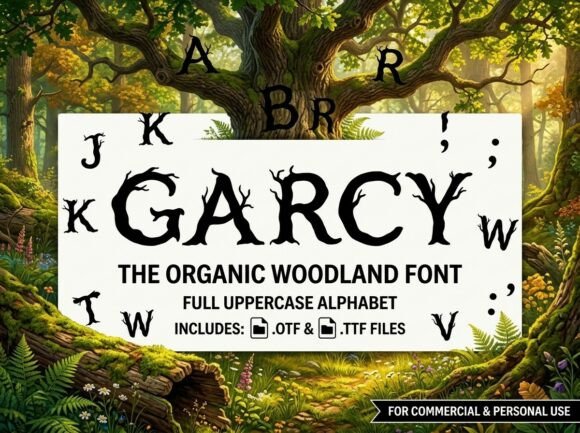
Perhaps the most critical detail to check before using Garcy is its character set. This is a point of friction for many users who skip the product description. Garcy is an ALL-CAPS uppercase-only display typeface.
What does this mean for you practically? It means the font does not include lowercase letters. For some, this is a non-issue; for others, it is a dealbreaker that is only discovered after the purchase.
- The Mistake: Assuming every font includes a full alphabet of upper and lower cases. Users often type a sentence expecting a "Title Case" look (e.g., "Garcy Font"), only to realize they cannot achieve that contrast.
- The Impact: This can halt a project's momentum. If your brand voice relies on the soft, approachable feel of lowercase letters, an all-caps font will feel aggressive or shouting.
- The Solution: Before buying, evaluate if your message works with constant shouting. All-caps fonts like Garcy are excellent for short, punchy statements, single-word logos, or monograms. If you need to write a full sentence, plan to pair Garcy with a secondary font that includes a lowercase set.
Avoiding the "One-Font-Fits-All" Trap
It is tempting to find a font you love and try to use it for every element of your design. However, using a heavy decorative font for everything destroys hierarchy. Imagine a poster where the headline, the date, the location, and the disclaimer are all written in Garcy. It would be visually exhausting.
Instead, treat Garcy as your "hero" element.
- For Logos: Use Garcy to create a unique mark. Its professional finish ensures it looks polished on merchandise or business cards.
- For Headlines: Use it to stop the scroll. A bold headline in Garcy draws the eye immediately.
- For Supporting Text: Pair it with a neutral, highly legible font. This contrast actually makes Garcy look better by comparison.
File Formats and Software Compatibility
When you invest in Garcy, you typically receive professional-grade files, specifically OTF (OpenType Font) and TTF (TrueType Font). A mistake often made by beginners is using the wrong file type for their specific software, leading to missing features or rendering errors.
- OTF (OpenType): This is the professional standard. If you are using advanced layout software like Adobe Illustrator, Photoshop, or InDesign, always install the OTF version. It supports advanced typographic features and offers the highest quality rendering.
- TTF (TrueType): This is your backup for universal compatibility. If you are working in older systems, basic text editors, or need the font to work seamlessly across various devices and operating systems without hiccups, the TTF file is the safer choice.
Overlooking this distinction can lead to frustration. If a font isn't behaving as expected in a complex design program, switching from TTF to OTF (or vice versa) is often the immediate fix.
Practical Advice for Evaluating and Applying Garcy
To ensure you get the most out of this decorative typeface, follow these practical guidelines:
Check the Kerning: Decorative fonts sometimes require manual kerning (adjusting the space between letters), especially in logos. Don't just type and go. Zoom in and look at the spacing between specific letter pairs (like 'A' and 'V') to ensure they look balanced.
Consider the Context: Because Garcy has a strong visual personality, it dictates the mood of the entire project. It is perfect for creative packaging or artistic headers, but it might feel out of place on a corporate financial report. Match the font’s energy to the project's requirements.
Test Before You Buy: Whenever possible, use a font previewer. Type out the specific words you intend to use. Since it is an all-caps font, you want to ensure the specific combination of letters you need creates a pleasing shape.
Conclusion: Making the Right Choice
Garcy is a powerful tool for any creator's arsenal, offering a polished, professional, and artistic finish that standard fonts simply cannot match. However, its power lies in knowing how to wield it. By acknowledging its all-caps nature, pairing it correctly with legible body text, and utilizing the correct file formats, you can avoid common pitfalls. Use it to elevate your headlines and logos, and you will find that Garcy is not just a font, but a statement piece that transforms your design from ordinary to extraordinary.