Understanding Music Notes: A Practical Guide to Dingbat Fonts for Visual Projects
When working on creative projects that involve music, whether for a concert program, a personal blog, or educational materials, the visual representation of musical notation can be crucial. However, finding the right way to incorporate these symbols without complex graphic design software can be a challenge. This is where a specific category of typography known as dingbat fonts becomes highly relevant. Among these, the Music Notes font stands out as a specialized tool designed to simplify the integration of musical imagery into text-based environments.
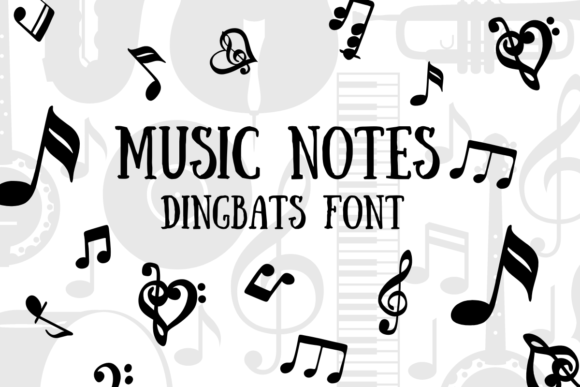
At its core, Music Notes is a dingbat font. Unlike standard typefaces like Arial or Times New Roman, which map keyboard keys to letters and numbers, a dingbat font maps keys to pictorial symbols. When you select the Music Notes font and press a key on your keyboard—say, the letter 'A'—instead of producing a letter, it renders a specific musical symbol, such as a treble clef, a quarter note, or a rest sign. This mechanism transforms the keyboard into a palette of musical icons, allowing for rapid insertion of these graphics into any application that supports text formatting, from word processors to design software.
What Sets Music Notes Apart in the Dingbat Category?
The world of dingbat fonts is vast, covering everything from arrows and geometric shapes to intricate ornaments and thematic icon sets. The distinctiveness of the Music Notes font lies in its focused specialization. While some comprehensive symbol fonts might include a handful of musical notes among hundreds of other symbols, Music Notes dedicates its entire character set to a wide array of musical notation. This typically includes not just common notes like crotchets and minims, but also clefs (treble, bass, alto), time signatures, dynamics markings (piano, forte), articulation marks (staccato, accent), and other nuanced symbols used in Western music theory.
This specialization means that for a user whose primary need is musical decoration, the font offers a more complete and coherent toolkit. There is no need to search through a long character map of unrelated icons. The symbols are logically grouped, which can streamline the workflow for someone creating a themed document. For instance, a music teacher preparing a worksheet might find it significantly faster to type using the Music Notes font than to search for and insert individual image files for each symbol.
Evaluating the Tradeoffs: When is a Dingbat Font the Right Choice?
Choosing the right tool depends heavily on the project's requirements, particularly concerning scalability, editing flexibility, and professional standards. The primary strength of using the Music Notes font is its sheer convenience and accessibility. It operates within the native text engine of any standard software. This means symbols can be easily sized, colored, and aligned using standard text formatting tools. For quick layouts, social media graphics, or documents where the symbols are primarily decorative rather than technically precise, this method is exceptionally practical.
However, this approach has inherent limitations compared to other methods. The symbols are static glyphs. While you can change their color and size, you cannot easily edit the individual components of a symbol, such as the stem direction of a note or the fill of a clef, as you could with a vector graphic in Adobe Illustrator or a dedicated music notation software like Sibelius or MuseScore. Furthermore, for formal music publishing or academic work, the spacing and exact typographic standards for music notation are highly precise. A dingbat font, while visually correct, may not adhere to the strict engraving standards required in professional scores, where minute adjustments to spacing and alignment are critical for readability.
Practical Applications and Ideal Use Cases
The decision to use the Music Notes font should be guided by the end goal of the project. It excels in scenarios where musical symbols are used as visual accents or thematic elements rather than as the primary content requiring technical accuracy. Consider these practical examples:
- Educational Materials: Creating flashcards, simple worksheets, or classroom posters where the focus is on recognition rather than publication-grade notation.
- Event Collateral: Designing invitations, programs, or menus for a musical event, recital, or gala where symbols add thematic flair.
- Digital Content: Enhancing blog posts, social media updates, or website headers about music with inline decorative elements.
- Personal Projects: Adding a musical touch to scrapbooking, greeting cards, or personal journals.
In these contexts, the Music Notes font provides a balanced solution. It offers more visual specificity than a generic symbol set and is far less cumbersome than importing and managing dozens of separate image files. The tradeoff of not being a fully editable music score is often acceptable because the symbols serve a decorative or illustrative purpose.
Comparing the Approach: Fonts vs. Other Symbol Integration Methods
When deciding how to incorporate musical symbols, it's useful to compare the dingbat font method with alternative approaches. The most common alternatives include using inline image files (PNGs, SVGs) or leveraging the symbol libraries within design software.
Using the Music Notes font is fundamentally different from inserting an image. An image is a discrete object that must be placed and aligned separately from text, which can disrupt text flow and complicate editing. A font symbol, by contrast, behaves like a character. It flows with the text, can be kerned, and inherits paragraph styles. This makes the font method superior for integrating symbols within sentences or paragraphs seamlessly.
Compared to the built-in symbol panels in applications like Microsoft Word or Adobe InDesign, a dedicated dingbat font like Music Notes often provides a more curated and extensive set of musical symbols in one place. While professional design software has powerful symbol management, for a user working primarily in a word processor, the font is a more direct and often more intuitive solution.
Making an Informed Decision: Key Factors to Consider
Before committing to the Music Notes font for your project, a brief evaluation can ensure it's the best fit. Ask yourself these questions:
- What is the primary function of the symbols? If they are for decoration or basic illustration, the font is likely sufficient. If they must convey precise musical information for analysis or performance, a dedicated notation tool is necessary.
- What is your technical environment? If you are working within a constrained environment like a basic web editor, a CMS, or a standard office suite, the font's compatibility is a major advantage.
- How important is editability? If you anticipate needing to modify the intricate details of each symbol after placing it, a vector-based approach is more flexible.
- Is consistency with professional standards required? For academic or commercial publishing, consulting a professional engraver or using industry-standard software is advised.
Ultimately, the Music Notes dingbat font occupies a valuable niche. It is not a replacement for comprehensive music notation software, nor is it intended to be. Instead, it serves as a highly efficient bridge between the desire to use musical imagery and the practical constraints of many common design and document creation tasks. By understanding its strengths as a specialized, easy-to-use typographic tool and acknowledging its limitations regarding technical precision, you can make a clear-eyed choice about whether it aligns with the goals of your current project. For many everyday applications, it presents a compelling combination of simplicity, variety, and visual impact that is difficult to match with other methods.