Mastering the Visual Voice: Practical Implementation of the Senior College Font
In the world of digital design and branding, typography is rarely just about picking a style that looks appealing; it is a functional tool that communicates hierarchy, tone, and reliability. When managing a project—whether it is a product launch, a rebranding effort, or a publishing cycle—the choice of typeface is a strategic decision that impacts the entire production pipeline. Senior College, a slab serif typeface characterized by its vintage elegance and robust stature, offers a specific solution for projects requiring high visibility and a traditional aesthetic. This guide explores how to integrate Senior College into professional workflows, ensuring that its bold charm translates into efficient execution and high-quality outcomes.
Understanding the Typographic Profile
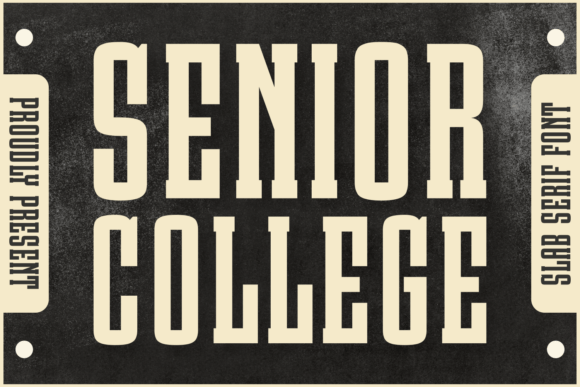
Before implementation, it is essential to understand the technical and aesthetic nature of Senior College. It is classified as a slab serif, a category known for its thick, block-like serifs. However, Senior College distinguishes itself through a blend of vintage collegiate styling and modern clarity. Its "robust, thick stature" implies high x-height and heavy strokes, making it a display font rather than a body text utility.
For project managers and designers, this distinction dictates the font's role in the hierarchy. It is not designed for long-form reading; rather, it is an accent font. Its primary function is to draw the eye, making it ideal for headers, hero text, and call-to-action statements. Recognizing this limitation early in the planning phase prevents layout issues later, such as overcrowding on a page or readability fatigue for the end-user.
Integration into the Creative Process
Implementing Senior College effectively requires a structured approach to the design workflow. It is a resource that fits best during the "visual identity" phase of a project, serving as the anchor for the brand's voice.
Phase 1: Strategic Planning and Pairing
The strength of Senior College lies in its boldness, but boldness requires balance. In the planning stage, consider the typographic ecosystem. A heavy slab serif pairs best with a neutral, legible sans-serif for body copy. When setting up your style guides or design systems, establish a clear pairing rule.
- Primary Action: Define Senior College exclusively for H1, H2, and logo lockups.
- Secondary Action: Select a clean sans-serif (such as Open Sans or Lato) for paragraph text to ensure the "neat design" of Senior College is not lost in a wall of text.
- Observation: Because Senior College offers multilingual support, you can maintain this pairing across different language versions of a website or publication without needing to switch typefaces for specific character sets. This streamlines the localization process significantly.
Phase 2: Execution in Branding and Apparel
Once the strategy is set, the font moves into the execution phase. This is where Senior College shines in specific applications like apparel design and authentic branding.
Apparel and Merchandise: When designing for print-on-demand or merchandise, the "robust stature" of Senior College is a practical asset. Thin fonts often fail to screen print correctly on fabrics, leading to bleeding or fading. Senior College’s thick strokes ensure legibility and durability on wearable quotes and logos. During the production phase, ensure your vector files maintain the font's integrity by outlining the text in your design software before sending it to the manufacturer.
Logotypes and Packaging: For packaging design, the font needs to stand out on a crowded shelf. The "vintage elegance" suggests a heritage or artisanal quality, making it suitable for food packaging, craft goods, or boutique branding. When applying it to packaging, use it to highlight the product name. The goal is to use the font’s inherent emphasis to guide the consumer’s eye to the most critical information instantly.
Workflow Efficiency and Compatibility
A practical workflow relies on tools that work seamlessly together. Senior College functions well across standard industry software, including the Adobe Creative Suite, Affinity Designer, and web platforms via webfont integration.
Print vs. Digital Environments
The font’s utility changes slightly depending on the medium.
- Print Covers and Magazines: In editorial design, Senior College creates an impactful statement. It is particularly effective for magazine mastheads or book covers where the title needs to convey a specific genre—often history, sports, or classic fiction. Here, the workflow involves kerning adjustments. Because slab serifs are wide, manual kerning is often required in headlines to ensure the letters do not appear too cramped or too loose.
- Digital Layouts: For web design, the font serves as a focal point for landing pages. It interacts well with high-contrast backgrounds. However, to maintain page load speed, it is advisable to limit the font weights loaded on the site to only those necessary for the headers.
Practical Implementation Tips
To maximize the value of Senior College in your projects, consider these operational best practices. These tips focus on organization, quality control, and long-term scalability.
1. File Management and Organization
When purchasing or downloading Senior College, immediately categorize the font files within your project management system or asset library. Label them clearly (e.g., "SeniorCollege-Bold-Web," "SeniorCollege-Bold-Print"). This prevents the common bottleneck of searching for assets during the final rush of a project.
2. Color and Contrast
Given the font's thick nature, it consumes significant visual real estate. When applying color, high contrast is recommended. Senior College pairs effectively with deep blacks, rich navy blues, or muted earth tones to support its "vintage" vibe. Avoid placing it on busy backgrounds unless a solid background shape or text box is used to separate it from the noise.
3. Seasonal Versatility
While the font has a "timeless appeal," it can be adapted for seasonal campaigns. Its structure allows it to feel academic and serious in the fall and winter, yet bold and sporty in the spring and summer. In your content calendar, earmark Senior College for campaigns that require a "punchy" headline. For example, a summer sale banner utilizing Senior College will feel energetic and authoritative, cutting through the visual clutter of a typical consumer's inbox.
4. Quality Control in Typography
During the review phase of a project, scrutinize the tracking and leading. Because Senior College is designed for emphasis, it usually requires generous leading (line spacing) when used for multi-line subheadings. If the lines are too tight, the text blocks will merge visually, negating the font's clean design. A standard workflow rule is to set the line height at 120-140% of the font size for optimal readability.
Conclusion: Elevating the Standard
Integrating Senior College into a professional toolkit is about more than aesthetic preference; it is about selecting a typeface that performs under pressure. Its ability to function across diverse applications—from greeting cards to logotypes—makes it a versatile asset for freelancers and agencies alike. By treating the font as a strategic component of the design process, rather than an afterthought, creators can leverage its "bold charm" to produce work that is not only visually striking but also structurally sound and efficient to produce. Whether you are crafting a brand identity or designing a one-off poster, Senior College provides the typographic weight needed to make a lasting impact.